

Product · October 18, 2026
Spotlight vs Raycast vs SearchOnMac: The macOS Launcher Showdown
Apple's built-in Spotlight, Raycast's extensible Node platform, and SearchOnMac's native Swift memory launcher. We compare speed, RAM usage, and daily search accuracy.

SearchOnMac Team
Engineering & Architecture · 6 min read
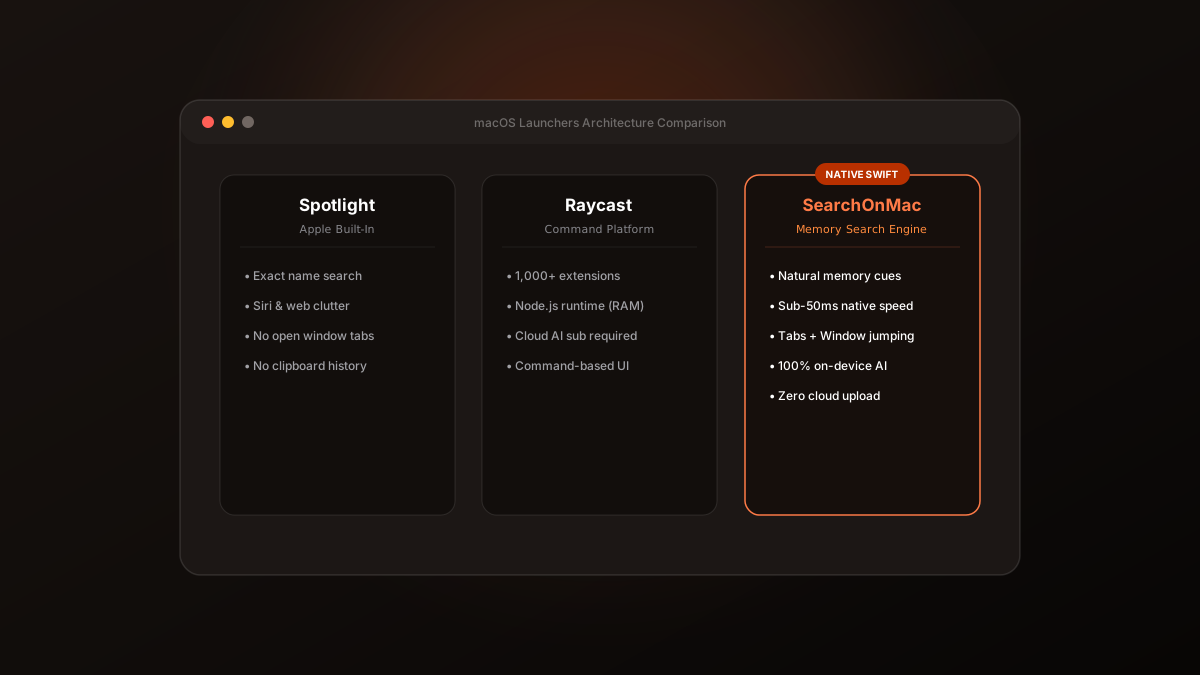
The macOS command launcher landscape has evolved dramatically. Today, Mac users are caught between three distinct philosophies: Apple's default Spotlight, community-driven platforms like Raycast, and dedicated native search engines like SearchOnMac.
1. Spotlight: The Ubiquitous Default
Pre-installed on every Mac, Spotlight excels at instant calculations and opening common apps. However, Apple has increasingly turned Spotlight into a web portal, frequently presenting Wikipedia snippets and web links above working documents.
2. Raycast: The Extensible Developer Platform
Raycast offers over 1,000 community extensions for GitHub, Jira, and Spotify. But running a Node.js runtime and React webview container requires continuous memory overhead (300MB to 800MB RAM) and cloud subscriptions for advanced AI features.
3. SearchOnMac: The Focused Episodic Memory Engine
Built purely in Swift with zero Electron or Node runtime, SearchOnMac runs sub-50ms searches while consuming under 30MB of RAM. Its AI engine runs 100% on-device on Apple Silicon via MLX, meaning your file contents and searches never touch the internet.
“Raycast is an operating system inside an operating system. SearchOnMac is a whisper-quiet, private local search engine.”
If you want developer automation, choose Raycast. If you want simple math, stick with Spotlight. If you want instant, private file search by memory, window tab jumping, and clipboard recovery, SearchOnMac is the tool for you.