

Privacy · October 22, 2026
On-Device AI vs Cloud AI: Why Desktop Search Must Stay 100% Local
Why sending file contents, searches, or clipboard data to cloud LLMs introduces latency and security risks, and how Apple Silicon unified memory makes local inference faster.

SearchOnMac Team
Privacy & Security · 5 min read
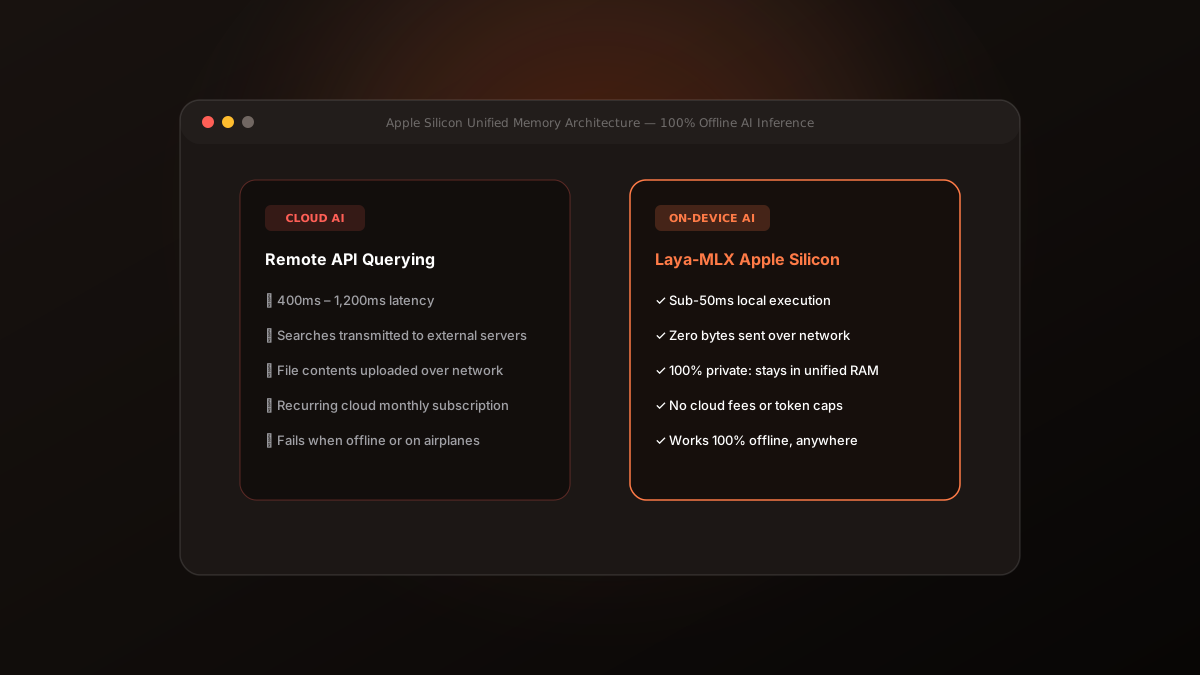
As artificial intelligence has entered the desktop operating system, developers have rushed to integrate cloud LLM APIs into launchers and search tools. But when it comes to searching your personal computer, cloud AI is fundamentally the wrong architecture.
1. The Privacy Reality of Cloud Search
Your Mac contains sensitive data: client contracts, source code, API credentials, personal tax filings, and clipboard snippets containing one-time passwords.
When a desktop utility sends search queries or extracts file contents to send to remote cloud servers, that private data travels across the public internet and sits in third-party server logs, vulnerable to telemetry harvesting and breach risks.
“Your computer's search index should never be someone else's training data.”
2. The Latency Problem: 50ms vs 1,200ms
Sending an HTTP request, waiting for token generation, and parsing the response takes between 400ms and 1,500ms under ideal network conditions—and fails completely when you are on an airplane or unstable Wi-Fi.
A launcher must respond within 50ms to keep pace with human typing cadence. Any perceptible delay breaks the illusion of immediate responsiveness.
3. The Apple Silicon Advantage: Unified Memory & MLX
Apple Silicon (M1 through M4) features Unified Memory Architecture (UMA), where the CPU, GPU, and Neural Engine share high-bandwidth memory. SearchOnMac leverages on-device machine learning that executes directly inside this unified memory pool in under 5 milliseconds with zero network requests.
The future of personal computing is local. By keeping search entirely on-device, SearchOnMac delivers instantaneous speed while giving you absolute peace of mind.